
A crypto payment link is a shareable checkout page for a specific payment request. Instead of sending a wallet address and explaining the token, network, amount and deadline in separate messages, the seller creates an invoice and sends one URL. The buyer opens the link, reviews the payment details and sends the transfer from a compatible wallet or exchange.
The blockchain transfer still goes to a receiving address. What the link adds is the business context around that transfer: what the payment is for, how much is expected, which routes are available, how long the request remains valid and whether a qualifying transfer has been matched to the invoice.
This makes payment links useful for freelancers, agencies, consultants and small businesses that agree individual sales in chat or email. They can issue a tracked USDT or USDC request without building a checkout or integrating an API. When a team manages several open requests, the small-business crypto invoicing workflow explains how to assign owners, follow statuses and reconcile every paid invoice. The workflow turns individual links into a repeatable operating process without pretending that the wallet supports automatic debit.
Non-custodial by design: with GramPayBot, the buyer sends funds directly to the merchant’s configured wallet. GramPayBot does not hold the revenue in an internal balance and does not need the wallet’s private key.
Crypto payment link vs wallet address
A wallet address answers one question: where can funds be sent? It does not identify the customer, explain what they are buying or tell the seller which of several incoming transfers belongs to the current order.
A message such as “send 250 USDT to this address” leaves important instructions in the conversation. The buyer still needs to know the network, whether the amount must be exact and how long the request is valid. The seller must preserve the agreement, watch for the transfer and connect it to the right client or project.
A payment link puts those details into an invoice before the buyer pays.
| Question | Wallet address in a message | Tracked payment link |
|---|---|---|
| What is the payment for? | Explained separately | Shown in the invoice description |
| Which token and network? | Easy to lose in the conversation | Selected from the seller’s enabled routes |
| What amount is expected? | Typed and checked manually | Displayed as an exact invoice amount |
| Which request was paid? | Reconciled after the transfer | Connected to a specific invoice |
| Is the request still open? | Often unclear | Has a visible status and deadline |
| Can the seller keep an internal reference? | Stored elsewhere | Saved as a private note |
| Does it resolve incorrect transfers automatically? | No | No; exceptions still require a policy |
The link does not make blockchain transfers reversible or error-proof. It gives both sides one consistent version of the expected payment and gives the seller a record to follow.
If you already send wallet details manually and are deciding whether the extra invoice layer is worthwhile, compare a crypto payment link with a wallet address.
How a crypto payment link works
1. Agree on the sale
The seller and buyer first agree on the service or product, price, delivery terms and any refund or cancellation policy. A payment link records the payment request; it does not replace the proposal, order confirmation or contract behind it.
Each sale should become its own invoice. Two clients may pay the same price for different projects, and a returning customer may make several payments over time. Separate invoices make those transfers distinguishable before they arrive.
2. Create the invoice
The seller enters the amount, a buyer-facing description and an optional private note. The invoice service creates a public invoice ID, calculates the available token amounts and gives the request a payment window.
Create the invoice before the buyer sends funds. The expected amount and payment context then exist before there is an on-chain transfer to investigate. See how to create a tracked crypto invoice for the product steps.
3. Send the checkout link
The invoice produces a browser checkout URL and can also produce a Telegram Mini App link. The seller can paste the URL into email, a proposal or a chat without building an address page, QR code, timer or payment-status interface.
The communication channel does not change the underlying invoice. If most sales begin in Telegram, see the dedicated workflow for accepting crypto payments in Telegram.
- NETWORK
- BASE · ERC20
- SEND EXACTLY
- 1,000.013427 USDC
- ADDRESS
- 0x71a4...93F2
● WAITING FOR PAYMENT
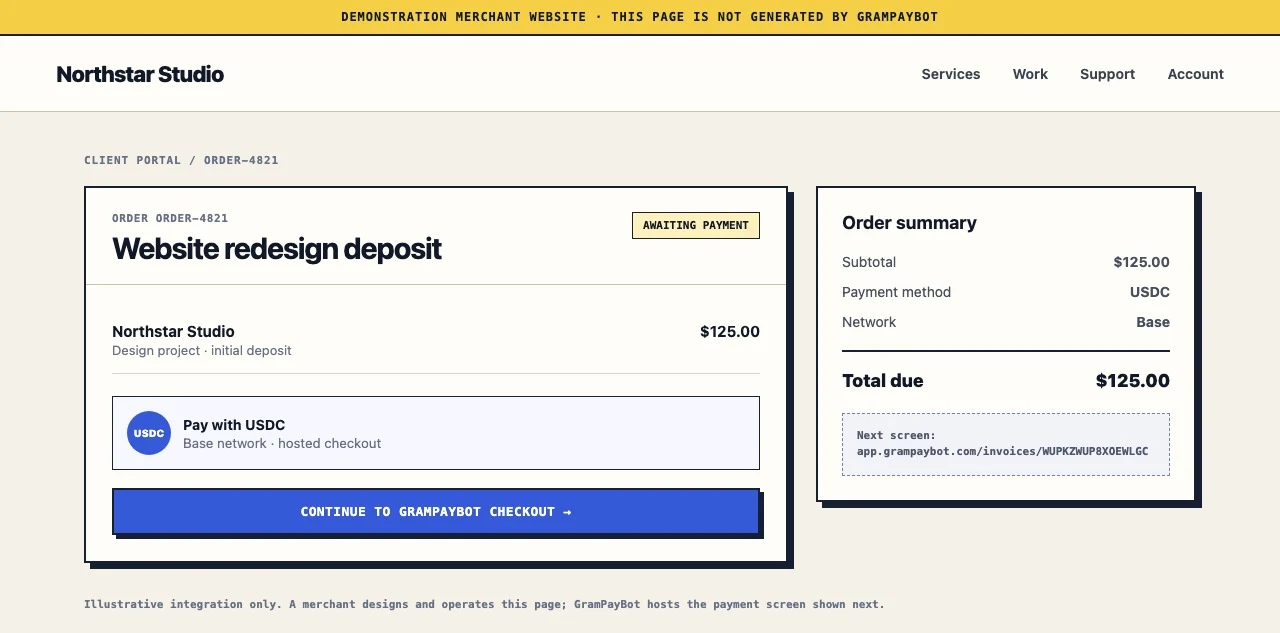
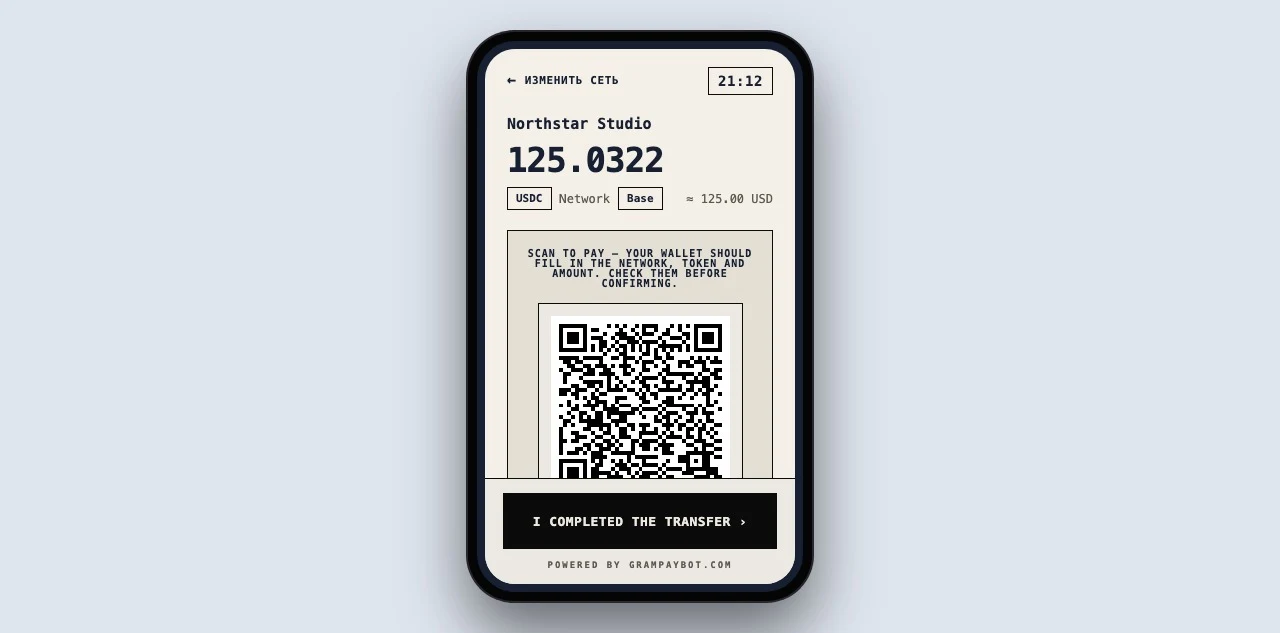
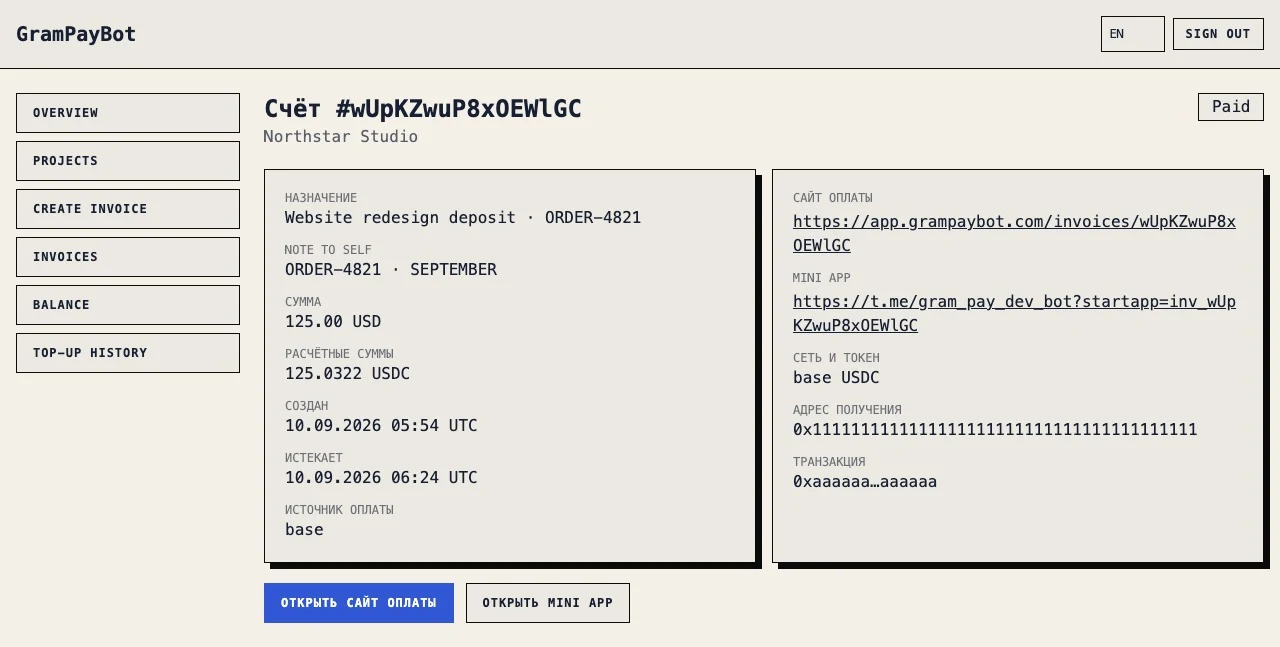
The same invoice can be followed from the merchant order through hosted checkout to the confirmed dashboard record:
Actual GramPayBot UI captured from the current product with synthetic data. The merchant website is an illustrative integration.
4. The buyer reviews checkout
Before sending, the buyer sees the invoice and payment purpose, the USD total, the available USDT or USDC routes, the exact token amount, the receiving address, a QR code, the time remaining and the current status.
The buyer chooses one route enabled by the seller and must use the same token and network in their wallet or exchange withdrawal. “USDT” alone is not a complete instruction: USDT on TRON and USDT on Ethereum are different payment routes.
With GramPayBot, the seller enters a USD amount and checkout shows the exact USDT or USDC amount for the invoice. The buyer should send the displayed amount without rounding it. The buyer checkout guide explains the payment page in more detail.
5. The buyer sends the transfer
The buyer pays from a compatible wallet or exchange account. The QR code can make it easier to open or copy the payment details, but the buyer should still review the token, network and amount before approving the transfer.
The funds go to the public merchant address configured for that route. The seller remains responsible for wallet access, backups and any later treasury movement.
6. The invoice records the result
Finding a transaction is not the same as proving that an invoice was paid. A payment system must compare the confirmed transfer with what the invoice expected. When the required conditions match, the invoice can move to paid and retain the transaction identity for later reconciliation.
The seller can then deliver the service, release a file, confirm a booking or update internal records according to the original agreement.
Public description and private note
A useful invoice keeps buyer communication separate from the seller’s internal context.
The public description should help the buyer recognize the request. “Website redesign — 50% deposit” is more useful than “Payment.” It should not contain confidential information because it appears in checkout.
The private note can contain an internal customer name, order number, proposal reference or project code. It helps the seller find the invoice later and is not shown to the buyer.
| Field | Example | Who sees it |
|---|---|---|
| Public description | “Brand identity — final milestone” | Buyer and seller |
| Private note | “ACME · PR-2026-041 · Maria” | Seller only |
This separation is valuable when several customers pay similar amounts: the invoice remains clear to the buyer while still being searchable for the merchant.
Payment-link statuses
An invoice status turns the request into a small workflow rather than a static page.
| Status | What it means | Seller action |
|---|---|---|
| Waiting | The invoice is active, but no qualifying payment has closed it | Do not fulfil yet |
| Paid | A qualifying transfer has been matched and recorded | Continue with the agreed delivery |
| Expired | The deadline passed while the invoice was still unpaid | Review a late claim or create a new invoice |
| Cancelled | The seller closed the request | Do not ask the buyer to use the old link |
The status is more useful than a screenshot or “payment sent” message because it represents the result of matching on-chain evidence to the expected invoice. A transaction hash can help locate a transfer, but the hash alone does not prove that it settled the current request.
How the transfer is matched
A reliable match needs more than a familiar token symbol or an incoming amount. The payment should satisfy the invoice’s expected:
- Network: the transfer occurred on the route selected at checkout.
- Token: the supported token contract or mint was transferred.
- Recipient: the destination matches the seller’s configured address.
- Amount: the received token amount matches the invoice.
- Time window: the transfer belongs to the relevant invoice period.
- Transaction identity: the same transfer has not already settled another invoice.
Only then should the payment close the invoice. A pending transaction may still fail; a successful transfer to another address or on another network is real, but it does not pay the original request.
What a payment link does not solve
A clear checkout reduces ambiguity, but it cannot remove every exception from an irreversible payment method.
An underpayment, overpayment, late transfer, wrong-network payment or ambiguous match may require manual review. The seller needs a policy for whether to request the difference, accept a late payment, issue a new invoice or return funds. Refunds are initiated by the seller from a wallet they control; an invoice link cannot reverse an on-chain transfer.
Use the dedicated playbooks for unpaid, late and expired invoices, underpayments and overpayments and USDT or USDC sent on the wrong network.
A paid status also does not settle a commercial dispute. It records that the expected payment conditions were met. Delivery, cancellation and refund questions still follow the agreement between seller and buyer.
Before sending a link, check that:
- the buyer will recognize the public description;
- the amount and deadline match the agreement;
- the private note contains the reference your team will search for;
- only routes your business is prepared to operate are enabled;
- the surrounding message does not contradict checkout;
- your team knows what to do with exceptional transfers.
Payment link or website integration?
The buyer may see the same hosted checkout in both models. What changes is who creates the invoice and where its result needs to go.
| Manual payment link | Website and API integration |
|---|---|
| A person agrees the sale | The merchant’s system creates an order |
| The seller creates an invoice | The API creates an invoice automatically |
| The link is sent in chat or email | The website opens checkout for the buyer |
| The seller follows the status | The system receives the payment result |
| Best for custom and one-off requests | Best for repeatable order flows |
If each sale begins with a conversation or custom quote, a manual payment link is usually the simpler starting point. If orders already originate on your website, use the website crypto payment flow.
Create your first tracked payment link
GramPayBot lets you create an invoice manually in Telegram or the web cabinet. The buyer opens checkout without creating a GramPayBot account, selects one of your enabled USDT or USDC routes and sends funds directly to your configured wallet.
You get one payment request with an amount, purpose, deadline, checkout and status—not a loose address followed by a screenshot.
Open GramPayBot in Telegram to create your first USDT or USDC invoice without writing code. You can also explore the complete payment-links workflow and review current pricing.
Next step
Create a tracked crypto payment link
Issue a USDT or USDC invoice manually, send one hosted checkout and follow its payment status without an API.
Explore payment links →