
A crypto payment link works well in Telegram, WhatsApp or email when the message explains the commercial context and the link remains the single source of payment details. Tell the customer what the invoice is for, its fiat reference amount and deadline; let the hosted checkout show the current token, network, amount and recipient. Then monitor the invoice status instead of asking for a screenshot.
The communication rule is simple: one obligation, one current link, one clear next action. Avoid sending a wallet address in one message, a network in another and a revised amount later. Those fragments can be copied out of order and create disputes.
| Put in the message | Keep in the checkout |
|---|---|
| Seller identity | Current token and network routes |
| Payment purpose | Exact settlement amount |
| Order/invoice reference | Recipient address and QR code |
| Fiat reference amount | Time remaining |
| Clear deadline or expectation | Live invoice status |
| Support contact | On-chain result when detected |
Prepare the invoice before writing the message
Create the order or customer obligation first. Give it a stable reference such as ORDER-4821, then create a payment invoice with the agreed fiat amount. Use the public description for a short phrase the buyer should recognize. Put staff-only context—CRM ID, salesperson or internal project code—in the private note.
Check the generated checkout yourself before sending it. Confirm the public description, amount, available routes and expiry. If the customer needs a route you did not enable, decide that before they transfer. Do not promise a token or network that the live page does not offer.
The step-by-step link creation guide covers those setup details. This guide focuses on the communication around the link.
Build a message that can stand alone
A useful message answers six questions:
- Who is requesting payment?
- What product, service or milestone is being paid?
- What is the order or invoice reference?
- What is the agreed reference amount?
- By when should the customer act?
- Where can they ask a question before sending?
It does not need to repeat the wallet address or calculated token amount. Those values are operational details that may depend on the selected route and should come from the checkout.
Telegram or WhatsApp template
Use a compact message for an existing conversation:
Hi Ana — here is the payment link for landing-page delivery, order ORDER-4821, agreed amount USD 125:
[secure payment link]Please open it before 18:00 UTC on 12 September and choose one of the token/network options shown there. Check the amount, network and recipient in your wallet before confirming. If the page has expired or anything differs from our agreement, message me here before sending.
Why it works:
- the customer recognizes the seller and purpose;
- the order reference connects the chat to the invoice;
- the amount is a commercial reference, while the checkout controls settlement details;
- the customer is told not to improvise after expiry;
- help stays in the trusted conversation.
For a returning customer, the message may be shorter, but do not remove the purpose and reference. “Pay here” plus a link is difficult to audit and resembles phishing.
Email template
Subject: Payment link for ORDER-4821 — landing-page delivery
Hi Ana,
Your invoice for the landing-page delivery is ready.
Order reference: ORDER-4821 Reference amount: USD 125 Payment deadline: 12 September, 18:00 UTC
Open the secure checkout:
[secure payment link]The checkout will show the currently supported USDT/USDC routes, exact amount and recipient. Please make sure the token and blockchain network selected in your wallet match the checkout. If the link has expired or the details do not match this email, do not send—reply to this thread so we can verify it.
We will confirm delivery after the invoice reports the payment as confirmed. You may keep the transaction hash for your records.
Regards, Example Studio
Email gives more space, but more text is not always better. Keep the link and key facts visible without making the customer search through legal or marketing copy.
A complete example across all screens
The seller creates ORDER-4821 for a USD 125 landing-page delivery, stores the client name privately and sends one link using the template above. The buyer opens the checkout and chooses USDC on Base. After the transfer is confirmed, the dashboard shows the invoice as paid with the same order context.
Actual GramPayBot UI captured from the current product with synthetic data. The merchant website is an illustrative integration.
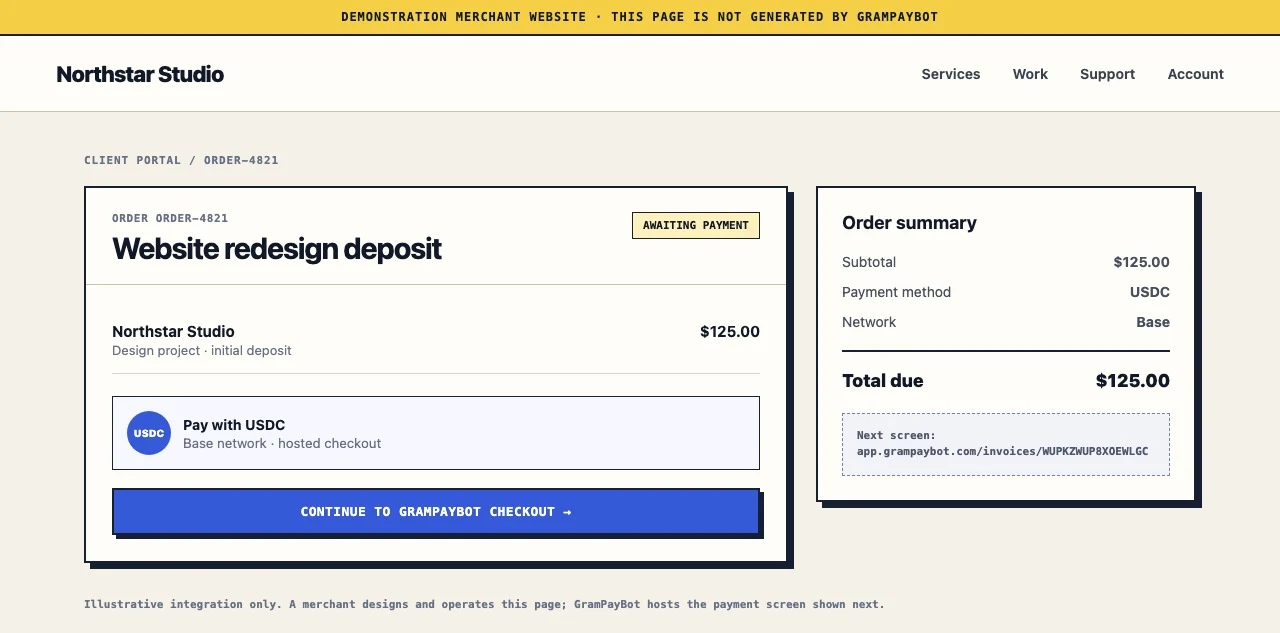
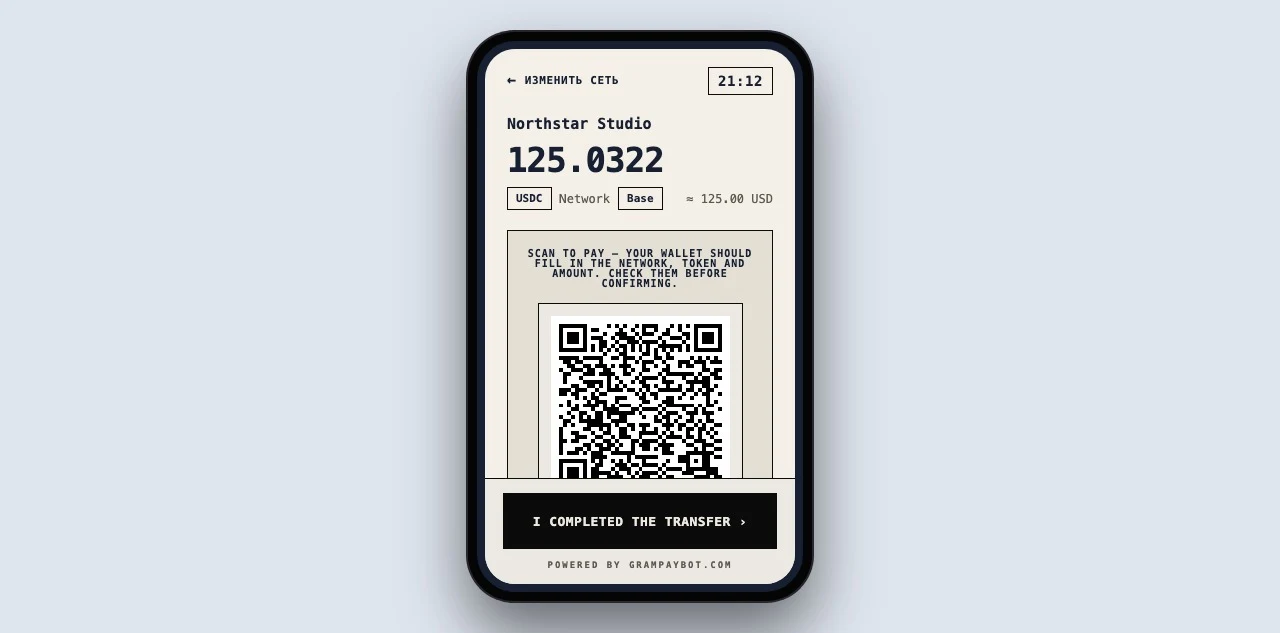
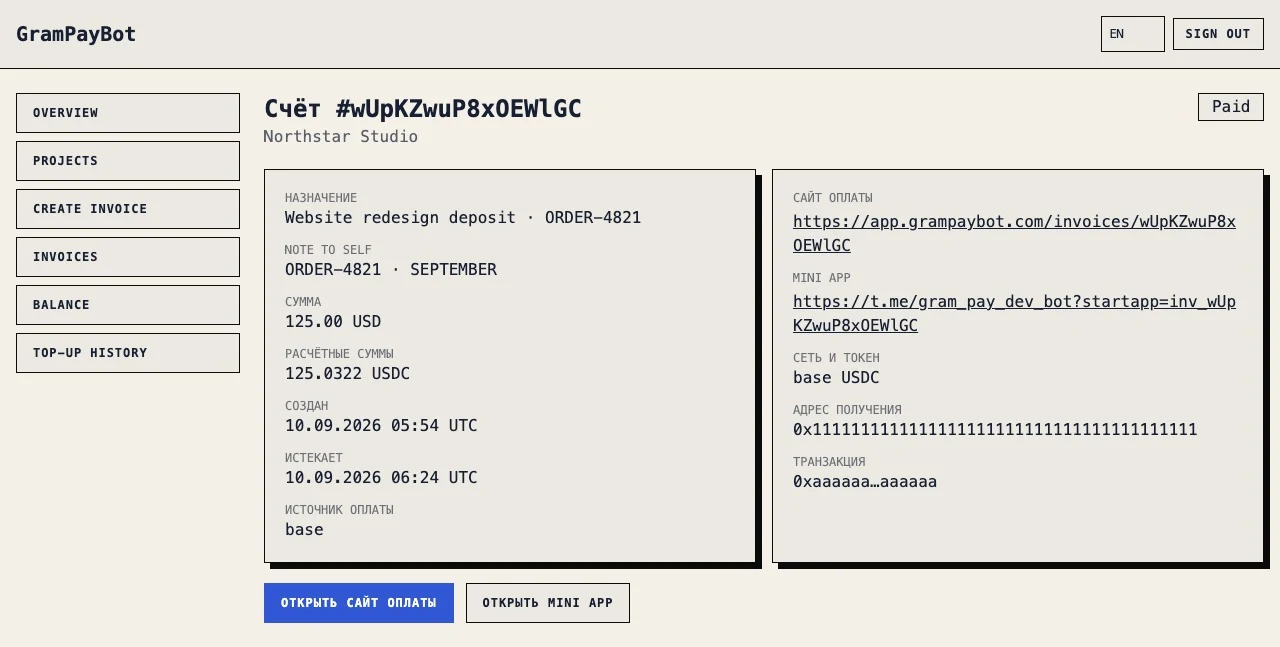
The merchant website is illustrative. The checkout and cabinet are actual current GramPayBot screens captured with synthetic business, order and wallet data, not a real transaction.
Do not paste a second set of payment details
The most dangerous message looks helpful:
Use the link, or just send 125 USDC to
0x...on whichever cheap network works.
It creates two competing instructions. The customer may choose an unsupported network, use the address after the invoice expires or send an amount that no longer corresponds to the checkout. If the hosted link is the intended workflow, keep route details there.
Also avoid screenshots of QR codes as the primary instruction. They can become stale, hide the domain and make it harder to see whether the invoice status changed. Send the URL; use an image only as an explanatory visual, clearly labeled as an example.
Match the tone to the channel, not the safety standard
Telegram and WhatsApp can be conversational, while email can be more formal. The required facts do not change. A direct-message customer still needs a purpose and deadline; an enterprise customer still needs one unambiguous action.
| Channel | Strength | Risk to manage |
|---|---|---|
| Telegram/WhatsApp | Fast clarification in an existing chat | Link may be buried or forwarded without context |
| Searchable record and structured subject | Spoofing, long threads and stale quoted links | |
| CRM/help desk | Shared team history | Agents may paste conflicting macros |
| Social direct message | Convenient first contact | Identity and account takeover risk |
If a customer first contacted you through social media, consider moving payment confirmation to a verified business email or established support channel. Never ask the buyer for a seed phrase, private key, login code or remote access.
Follow up without pressuring the buyer into a mistake
If the invoice remains unpaid, refer to the same order and link while it is valid:
Reminder: invoice ORDER-4821 for USD 125 is still awaiting payment. Please use the original checkout link before 18:00 UTC. If it has expired, tell me and I will issue a current invoice; do not send using saved details.
Do not create several replacement links while older ones remain unexplained. If you must replace a link, explicitly state that the old invoice should no longer be used and record which invoice superseded it.
When the dashboard shows a confirmed payment, acknowledge it without asking for sensitive wallet information:
Payment for ORDER-4821 is confirmed. We have matched the on-chain transfer to your invoice and will proceed with delivery.
What to do when the customer sends a screenshot
Thank them, but verify using the invoice and blockchain data. A screenshot can be edited or show a pending, failed or unrelated transfer. Ask for the public transaction hash if the invoice has not updated. Then compare token, network, recipient, amount, time and confirmation state.
Do not instruct the customer to pay again until you know what happened to the first transfer. An exchange may show “processing” before it broadcasts a transaction. A blockchain transfer may be confirmed while the invoice awaits manual review. In both cases, a duplicate makes the situation worse.
Handle common exceptions consistently
Expired link before payment. Create or provide a current invoice. Tell the customer not to use previously copied address or amount.
Customer says a network is unavailable. Check the live routes. Offer another route only through the checkout; never improvise an untracked address.
Payment made after expiry. Preserve the invoice and hash, review the transfer, and make a documented decision. Do not pretend the payment never arrived.
Wrong token or network. Escalate for technical review. Recovery depends on address control and should not be promised.
Underpayment or overpayment. Compare actual receipt with invoice. Apply a written policy rather than silently editing the original obligation.
Forwarded link. Verify which customer and order the invoice belongs to before changing delivery details. The payer and buyer can legitimately differ, but the obligation must remain clear.
Team operating checklist
- Create the order before the invoice.
- Use a recognizable public description.
- Keep private context out of the buyer-facing text.
- Review the checkout before sending.
- Send one canonical link.
- State purpose, reference, fiat amount and deadline.
- Tell the buyer to use routes shown on the page.
- Store the sent channel and timestamp in the customer record.
- Monitor invoice status instead of relying on screenshots.
- Save the confirmed hash with the order.
- Define who handles expiry, mismatch and recovery questions.
- Revoke or clearly supersede incorrect instructions.
Privacy and record keeping
Do not put unnecessary personal information on a public checkout or in a URL that may be forwarded. A customer name, phone number or detailed contract terms may belong in your CRM, not in the public description. Use the smallest recognizable description and an internal reference for staff.
Retain enough history to answer who sent the link, when, for which obligation, and which transaction settled it. That history is useful for support and accounting without turning a chat export into your only ledger.
Final rule
The link should carry changing payment mechanics; your message should carry stable commercial context. When the customer receives one recognizable request, opens one current checkout and sees one consistent status, both payment safety and reconciliation improve. If the buyer needs help completing the other side of the process, send them the buyer guide to paying an invoice with USDT or USDC.
Next step
Create a tracked crypto payment link
Issue a USDT or USDC invoice manually, send one hosted checkout and follow its payment status without an API.
Explore payment links →